Claude Code at home
The house gets a soundtrack
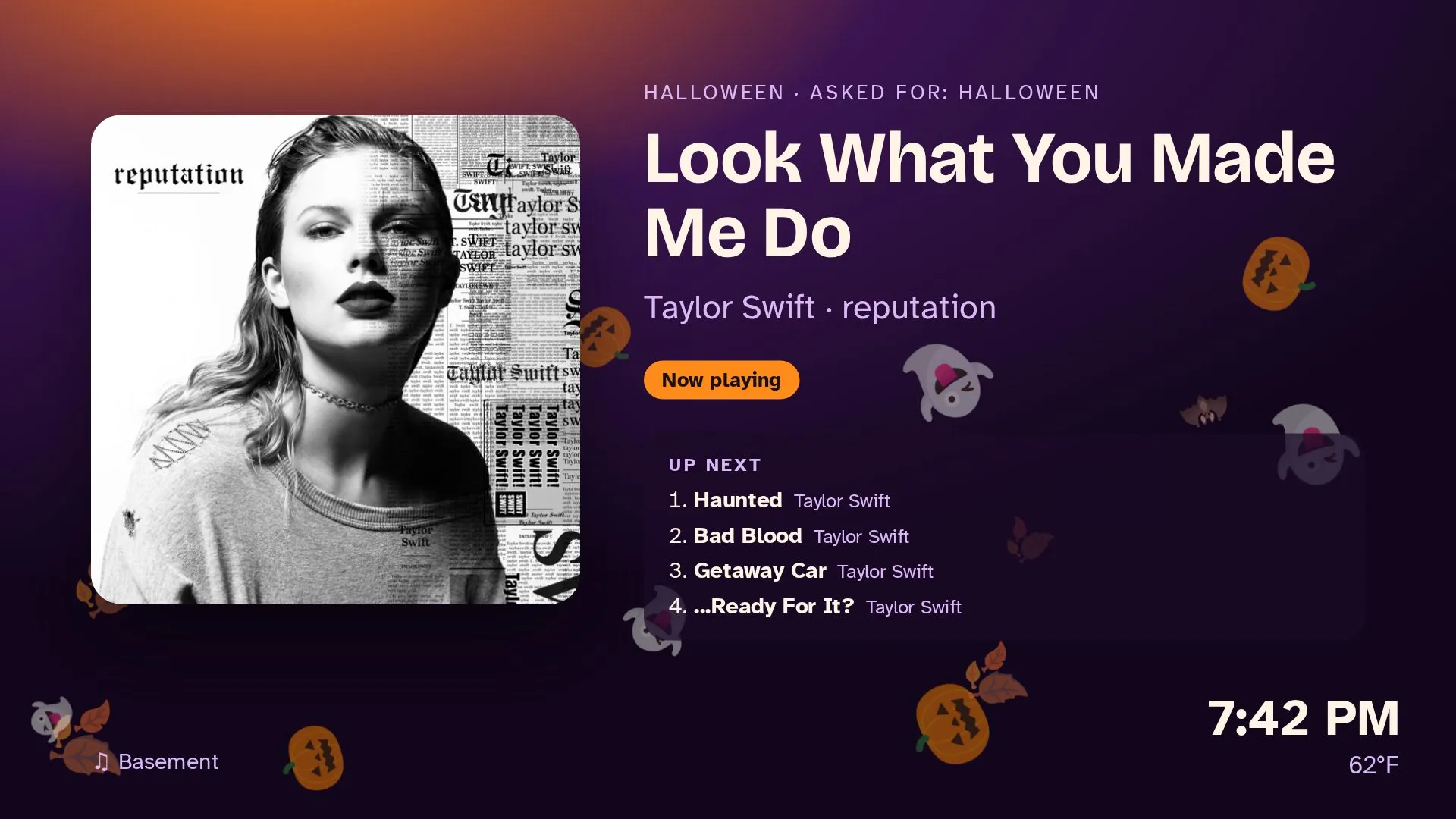
I asked Claude Code, running on a computer in my basement, to play a Halloween mix and put something nice on the TV. It worked out how to drive my Apple TVs, a Samsung Frame and a Denon receiver as it went, built a live 4K "now playing" screen, and found and fixed its own memory leak along the way.
The short version
- Claude Code runs on an always-on Linux machine on my home network, where it already runs a household assistant I text on Telegram and iMessage.
- Over about a day of casual messages, it learned to play music to my Sonos speakers, Apple TVs and a Denon receiver, and to show an animated, seasonal “now playing” screen on whichever TV is in that room.
- Every TV needed a different trick. Claude Code found each one by trying, failing and reading the device’s own replies, and wrote down what worked.
- The hardest part was making the screen smooth at 4K: a memory leak that crashed my session, a benchmark, and moving the encoding to the graphics card.
- At the end there’s a single prompt you can give your own Claude Code to do the same.
The setup
The machine is a Linux VM on a home server: 12 CPU cores, 30 GB of RAM and an RTX 3090 that mostly runs a local language model. On it runs a small household platform I’ve been building with Claude Code for a few weeks: an assistant the family texts, a web portal, a calendar, lists, package tracking. The assistant answers with Claude and a set of tools: look things up, add to the calendar, play music, move the shades.
The house has Sonos speakers in most rooms, three Apple TVs, a Samsung Frame in the living room, and a Denon AVR-X3700H receiver in the basement with an Apple TV plugged into it. None of it was set up for this, and I hadn’t told Claude Code what most of it was.
What I asked for
I didn’t write a spec. These are the messages I typed, in order, from a Friday night to Saturday lunchtime:
- Fri night
Can you play to Apple TVs?
- Fri night
Ideally we could play to them and display graphics along with the music playing to them
- Fri night
Also would be great if we could send direct to Samsung tvs on the network
- Fri night
Now show animated playlist and play the music on Sonos kitchen. Make it a dark Taylor swift Halloween mix
- Fri night
The animation is laggy make it smooth
- Sat morning
Create a fall indie playlist and play to AppleTV family room
- Sat morning
Can you switch your playing on basement receiver and basement Apple TV?
- Sat morning
I want you to do it
It had told me which input to pick on the receiver. I asked it to do that part as well. - Sat morning
Make the video 4k so less fuzzy. Also make background a fall mountain nature scene
- Sat morning
This looks great so in the future, I wanna be able to message [the assistant] with a prompt and he will create a playlist…
- Sat morning
Just a few critiques every 3 to 7 seconds the animations pause also the song that’s actually playing isn’t always in sync with what it says on the screen
- Sat noon
Why does 4k lag if I can watch movies in 4k and they don’t? What is the bottleneck
Apart from that, my only part was reading a four-digit pairing code off the TV when it asked, and once approving a sign-in to Spotify.
One house, five different answers
“Play to the TV” sounds like one thing. In practice every device in the house wanted something different. Here’s what Claude Code tried, what the device said back, and what ended up working.
| Device | First try | What happened | What works |
|---|---|---|---|
| Apple TV: music | Spotify on the TV | Spotify’s API plays to a TV only with my own sign-in, and every Apple TV shows up in it as plain “Apple TV”. | A one-time Spotify sign-in, then Spotify Connect: open the Spotify app on the TV and play to the device that appeared just after it opened. |
| Apple TV: the screen | AirPlay “play this URL” | tvOS accepts the request, then ignores it. The TV never fetched the stream, MP4 or HLS. | Open the stream in VLC with a deep link (vlc://…) over the Companion protocol. The first time, tvOS asks “Open in VLC?”, so it presses Select on the virtual remote. |
| Samsung Frame | DLNA with the HLS stream | Refused (UPnP error 716). It takes files, not playlists. | The same video as one endless MPEG-TS stream over DLNA, with the right DLNA flags. Wake-on-LAN turns it on; a short press of power sends it to art mode, not off. |
| Denon AVR-X3700H | Treating a Sonos Port as the “basement receiver” | Wrong device; I corrected it. | The receiver’s telnet control on port 23. Spotify plays on its network input, and SVMPLAY takes the picture from the Apple TV’s input while the sound stays on Spotify. |
| Sonos | Already worked | It played “Don’t Blame Me (Commentary)”, a spoken track, instead of the song. | Search now folds curly apostrophes and ranks commentary, karaoke and live cuts last. |
None of this came from a guide written for my house. It came from trying the obvious thing, reading the error or the silence, and trying the next thing. The UPnP error number, a log showing the TV never fetched the file, the receiver’s reply to SI?: each changed the plan. At each step it wrote down what worked, in a notes file and in the code’s own comments, so the assistant can do it again without rediscovering it.
How the screen works
An Apple TV has no web browser, so the TV can’t just open a web page. The screen is made as video on the home server and streamed to the TV:
flowchart LR
A["Phone: a text to the assistant"] --> B["Assistant on the home server"]
B --> C["Spotify or Sonos plays the music"]
B --> D["Headless Chrome draws the still"]
D --> E["ffmpeg: drifting decorations at 30 fps, then encode"]
E --> F["Stream on the home network, behind a random token"]
F --> G["Apple TV, in VLC"]
F --> H["Samsung Frame, over DLNA"]
B --> I["Denon: picture from the Apple TV, sound from Spotify"]
- The look. A small module picks a theme from the date, the weather (from open-meteo) and the family’s birthdays. A clear October evening is Halloween, a grey one is autumn leaves, and a family birthday today or tomorrow is balloons. If you ask for a vibe, that wins.
- The still. Headless Chromium renders a 1280×720 page in that theme at 3× scale (3840×2160) whenever the song changes, and otherwise just updates the clock.
- The motion. The browser can’t take 30 screenshots a second at 4K, so it doesn’t try. It draws each falling leaf or pumpkin once, as a transparent picture, and ffmpeg moves each one along its own path, falling, swaying and turning, at 30 frames a second.
- The stream. The result goes out as HLS in 1-second pieces for the Apple TVs, and as one continuous stream for the Samsung. It’s only on the home network, at an address with a random token in it.
- Staying in sync. Every 1.5 seconds it asks Spotify or Sonos where it is in the song. Video on the TV runs a few seconds behind, so the screen switches to the next song that many seconds early, and the title changes when the music does.
Making it good: fuzzy, then laggy, then a crash
The first version worked, and it was soft: 720p video on a 4K TV. I asked for 4K. Then I sat in the basement and noticed the falling leaves froze every few seconds, and the song name on screen didn’t always match the song.
Claude Code went to measure it. Its first speed test ran in the same session I was talking to it from, and the session died. Twice. I had to restart Claude Code on the server. I asked why, and pointed out this hadn’t happened in weeks.
The cause, from the kernel log: ffmpeg had grown to 25 GB of memory, and the out-of-memory killer took the whole terminal session down with it. Each decoration had been an endless looping picture input. ffmpeg read those as fast as it could while the real screen only arrived twice a second, so frames piled up without limit. The fix: give ffmpeg each picture once and loop it inside the filter graph, so a frame is made only when one is needed, and run the encoder in its own systemd scope with a 4 GB ceiling, so a runaway can only ever kill itself.
Memory went from 25 GB to about 0.6 GB. Then the actual benchmark: 10 seconds of the real screen, and how long it takes to make. Anything under 1× real time means the TV runs out of video and pauses.
Speed as a multiple of real time; the dashed line is 1×. 12 CPU cores, an RTX 3090 shared with a local language model.
Why 4K movies don’t lag but this did
I asked exactly that. A movie is compressed once, slowly, by the studio, and your TV only decompresses it, on a chip built for it. This screen is compressed live, 30 frames a second, on the server’s processor, and compressing is many times more expensive than playing back. At 4K the processor managed 0.64× real time, so the TV ran dry every few seconds. Those were the pauses.
The graphics card has a dedicated encoder (NVENC) that makes 4K compression nearly free. The ffmpeg bundled with the Python package couldn’t use it, so Claude Code fetched an LGPL build that can, and checked it worked inside the VM. Then it measured again, and the bottleneck moved: compression went to 3.57×, but laying 14 decorations over every 4K frame cost about 4 ms each on the processor.
It tried doing the decorations on the graphics card too. That ran out of graphics memory, because the local language model already holds 20.5 of the card’s 24 GB. It weighed 1440p with all 14 decorations against 4K with fewer, and chose 4K with 7: sharp text and cover art matter more than more falling leaves. On a machine without the graphics card it falls back to 1080p on the processor, which keeps up.
The sync bug was hiding in the numbers
While checking the new version, it noticed the video pieces were 2 seconds long, not the 1 second the timing assumed. HLS can only cut a piece at a keyframe, and keyframes came every 2 seconds, so the TV ran about 3 seconds further behind than the screen allowed for and changed songs late. One setting fixed it: a keyframe every piece.
As I write this, the final version has passed a 75-second full dry run: the real mountain screen, the real encoder, steady memory, video produced exactly in real time. The two-minute watch on the basement TV is next.
The guardrails that made me comfortable
Letting an AI agent loose on the devices in your house sounds reckless. These are the rules the project runs under, set in its instructions file early on:
- Never move a device nobody asked to move. It asks before turning a TV on or playing anything in a room I didn’t name. The automated tests are fenced off from every real device, so 2,100 tests never touch a speaker.
- Secrets live in one file outside the repository. The Spotify token, TV pairing keys and Samsung’s remote token never touch the code. The code goes to GitHub only through a check that refuses to push anything personal.
- Heavy jobs get a ceiling. After the crash, every encoder runs with a hard memory limit, and benchmarks run in the background.
- It says when it doesn’t know. It thought holding the power key would turn the Frame off. I turned the TV off myself before it could check, so its notes record that as unverified. They don’t claim it worked.
- Everything gets written down. A handoff file, a decisions log with the measurements, and an ideas list. The next session, or the assistant itself, starts from what was learned.
Where this is going
The goal is one text: “something moody and autumnal for the basement, about an hour”. The assistant makes the playlist, lets me swap songs, generates a background from the prompt, and knows the basement means Spotify on the Denon, the picture from its Apple TV, and the receiver’s video input. Each room’s setup goes in a small config file:
[[home.areas]]
name   = "Basement"
music  = "spotify:Denon AVR-X3700H"
screen = "appletv:Basement"
video  = { denon = "192.168.50.20", input = "MPLAY" }
That’s next. The interesting part is already done: the agent worked out how my particular house works, from the house itself.
Try it in your house
You need Claude Code on a computer that’s always on and on the same network as your TVs and speakers: a Linux box, a Mac mini or a home server. A GPU is optional; it just buys you 4K. Then give it this, and answer its questions as they come.
The one prompt
You're running on a computer on my home network. I want to say things like "play a cozy fall indie mix in the living room" and have the music play on that room's speakers while the TV in that room shows an animated "now playing" screen dressed for the moment (season, holidays coming up, the weather, time of day).

Work in this order, and stop to ask me whenever a step would change a real device:

1. Discover. Find the media devices on the network (mDNS/Bonjour, SSDP/UPnP, ARP): Apple TVs, Sonos, Chromecasts, smart TVs (Samsung, LG, Sony), AV receivers (Denon/Marantz, Yamaha, Onkyo). List what you found with model and address, and ask me which room each is in and how they're wired together (e.g. "the Apple TV is plugged into the receiver"). Don't turn anything on or pair anything until I say so.

2. Music. Use what I already have. Sonos: control it locally (SoCo). Spotify on a TV or receiver: Spotify Connect via the Web API with the authorization-code flow (needs Premium); walk me through the one-time sign-in. Search carefully: skip commentary, karaoke and live versions unless asked.

3. The screen. Render a 1280x720 HTML "now playing" page (cover, title, artist, up next, clock, temperature) with headless Chromium at 1.5x or 3x scale, redrawn only when the song changes. Draw falling decorations (leaves, snow, pumpkins) once each as transparent PNGs, and let ffmpeg animate them at 30 fps. Give each picture as a single input and loop it inside the filter graph; never use an endless looping input, it buffers without limit. Stream HLS (1-second segments, keyframe interval = segment length) plus one continuous MPEG-TS for TVs that refuse HLS. Serve only on the LAN, under a random token path.

4. Get it onto each TV, by whatever that TV accepts. Try, read the error, try the next thing, and tell me what you learned. Known routes: Apple TV via pyatv (pair once; AirPlay URL playback is ignored by recent tvOS, so open the stream in VLC with a vlc:// deep link and press Select if it asks); Samsung via DLNA AVTransport (port 9197) with the MPEG-TS stream, Wake-on-LAN to turn on; Chromecast via pychromecast; Denon/Marantz receivers via telnet on port 23 (input select, and video select so the picture comes from one input while sound comes from another).

5. Performance and safety. Run every ffmpeg under a memory cap (systemd-run --user --scope -p MemoryMax=4G -p MemorySwapMax=0, or the equivalent on your OS), and run benchmarks in the background, never in this session's foreground. Benchmark 1080p/1440p/4K before choosing; pick the sharpest setting that encodes at 1.3x real time or better. If there's an NVIDIA GPU, use h264_nvenc (an LGPL ffmpeg build that includes it); keep other work on the processor if the GPU's memory is busy.

6. Sync. Poll the player's position every second or two, and switch the screen to the next song a few seconds before the current one ends, by about as much as the TV's buffer is behind.

7. Write it down. Keep secrets (tokens, pairing keys) in one env file outside any repository. Put each room's setup (speakers, TV, receiver input, which route works) in a config file, and record what worked, what failed and why in a notes file, so next time it's one command. Write tests that never touch real devices.

Start with step 1 and show me what you find.
Expect to be asked for a pairing code or two, and to approve one Spotify sign-in. Expect it to get something wrong about your house, the way it guessed my receiver. Correct it in a sentence, and it’ll write the correction down.