Claude Code on a dev box
One server, many sessions
I drive Claude Code from my phone through one long-running session on a dev VM. I asked whether I could run several at once. The answer was a Remote Control server: one process that starts new sessions on demand, across all my repos, each change in its own git worktree.
The short version
- I already drove one Claude Code session on a dev VM from the Claude app on my phone. I wanted several at once.
claude --remote-controlgives you one session you can reach remotely.claude remote-control, the subcommand, is a server: it keeps running and starts a new session every time you tap+in the app, up to 32 by default.- I run the server in my
~/reposfolder, so every session can read every app. ACLAUDE.mdrule and a small hook make each change happen in its own git worktree, so parallel agents don’t trip over each other. - systemd and tmux keep it alive through closed laptops, dropped SSH and reboots.
- The server process uses about 145 MB, and each session about 230 to 250 MB, on Claude Code 2.1.289.
- At the end there’s a prompt to set the same thing up on your machine.
The setup
The machine is a Linux VM I use for development: 12 CPU cores and, after a resize that evening, 81 GB of RAM. It holds a handful of repos side by side in ~/repos, one per app. I reach it from VS Code over SSH, and from my phone through the Claude app’s Remote Control, which lets the app talk to a Claude Code process running on the VM.
Until this week that meant one session. A systemd unit started claude --remote-control inside tmux at boot, in one repo, and I talked to it all day from my phone. It worked, but it was one conversation in one folder. A second idea meant waiting, or cramming it into the same context. And a session I depended on had already gone quiet on me once that morning.
What I asked for
These are the messages I typed, in order. The first is from Saturday morning, after my phone session stopped answering. The rest are from Saturday night.
- Sat morning
so i was just working with you in a long-standing remote session which seems to have crashed. can you check to see what the last worktrees and local work was
- Sat night
I have a long-standing claude code session which I propped up using tmux and which I use to develop indefinitely via the claude app on my phone (via remote control). Is it possible to stand up multiple such sessions for mutli-tasking? If so, are they going to be scoped to a specific repo/folder or can I have these agents work across many repos (folders) on the dev machine?
- Sat night
Ok so does my current claude session on that machine have the ability to spawn multiple sessions? is it a server?
- Sat night
will this server only be good for the agent harness? I kinda want my agents to be able to operate across multiple repos. Like i have a repos dir and many sub dirs for my apps. But somteimes I want to say ‘borrow X from repo Y’ or ‘can you scan all of my apps and create a dashboard summarizing them all’. I also want separate worktrees to be spun up as standard for each bit of work being performed within a given sub dir to avoid agents creating conflicts.
Claude Code had started the server in one repo. This is where the design changed. - Sat night
ok i think it is running. i tried to close the ssh but it asks if i want to terminate
- Sat night
so how do i spin up a session in claude code?
- Sat night
did it
After tapping + in the app. Claude Code read the server's screen to confirm.
A session and a server are different things
A session is one conversation with one agent: its own context, its own history, one working folder. Plain claude in a terminal is a session. Add --remote-control, or type /remote-control inside it, and that one session becomes reachable from the app.
A server is what claude remote-control starts. It belongs to a folder, creates one session straight away so you have somewhere to type, and then starts more whenever you ask from the app or from claude.ai/code. Each session is its own Claude Code process with its own context.
One hyphen apart. My boot unit ran claude --remote-control, the flag. That is an ordinary interactive session with remote access turned on: one conversation, and nothing in the app can start a second. The server is the subcommand, claude remote-control, with a space. Claude Code found the flag in the unit file and in the running process, and that answered my “is it a server?” question: no.
flowchart LR
subgraph many["claude remote-control (subcommand)"]
  P2["Phone or browser"] --> SV["Server in ~/repos"]
  SV --> A["Session 1"]
  SV --> B["Session 2"]
  SV --> C["More, up to 32"]
end
subgraph one["claude --remote-control (flag)"]
  P1["Phone"] --> S1["One session, one folder"]
end
The help text says it plainly once you know where to look:
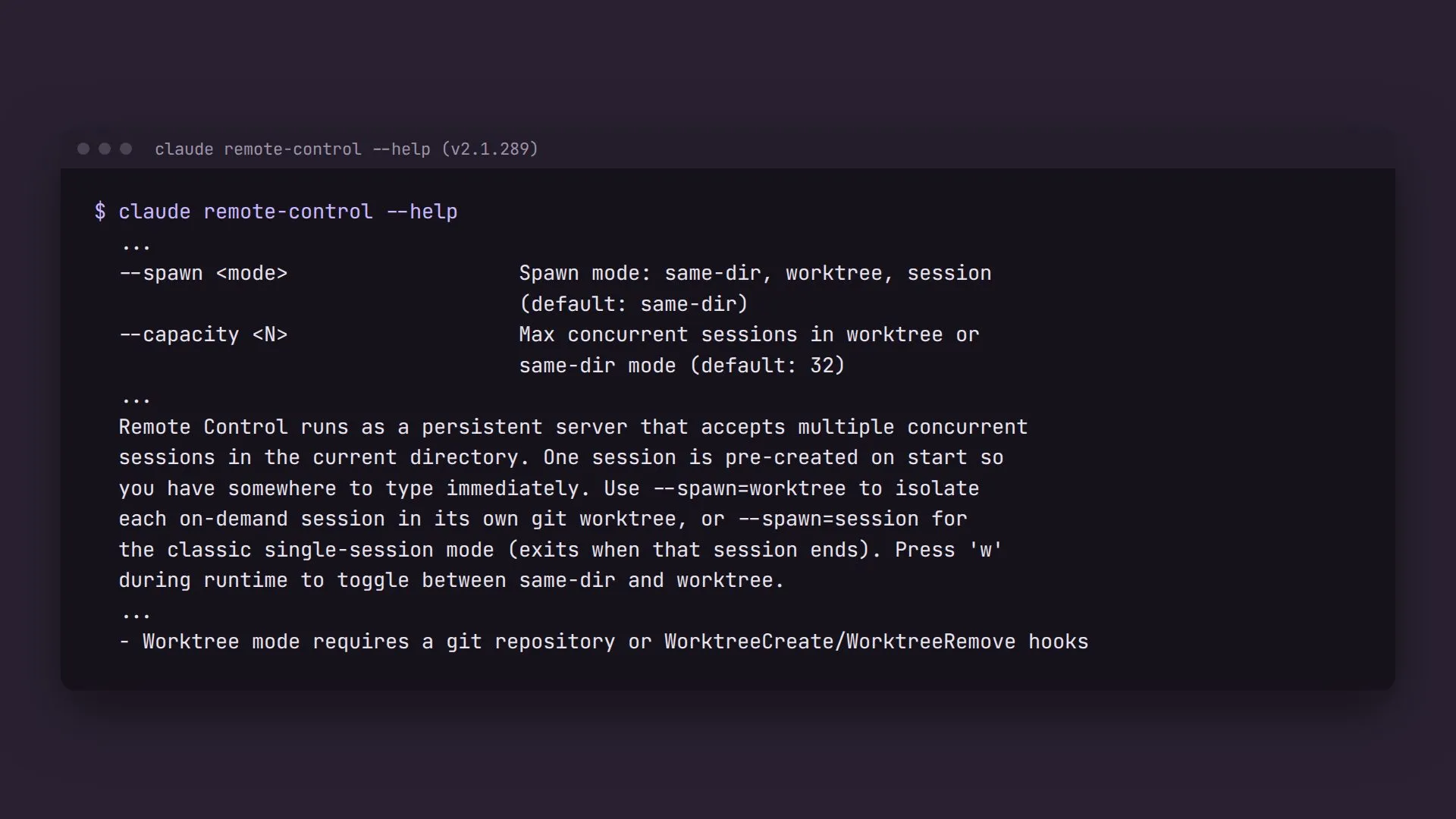
Here’s how the two compare on my VM:
Single session (--remote-control) |
Server (remote-control) |
|
|---|---|---|
| Conversations | One | Up to 32 at once (--capacity) |
| A new conversation from the phone | Not possible; someone has to start one in a terminal | Tap + next to the server’s folder in the app |
| Keeping parallel work apart | Nothing to keep apart | --spawn worktree in a single repo, or rules and a hook across many |
| Memory | One process, 230 to 450 MB in my measurements | About 145 MB for the server, plus about 230 to 250 MB per session |
| Best for | One long thread of work | Several tasks at once, and quick side questions |
Where it shines
Several tasks at once from a phone. I start one session to fix a bug in one app, another to research a library, and a third to answer a quick question. None of them waits for the others or fills the others’ context. In the app’s sidebar they sit under one heading, the server’s folder, with a + beside it.
Work across repos. Because my server runs in ~/repos, every session can see every app. “Borrow the date picker from repo Y” means the agent reads Y and writes into X. “Scan all my apps and make a dashboard” is one request, not a tour of separate sessions.
Short side questions. A long-running session carries hours of context. A fresh session for “how much memory is free?” costs little and leaves the main thread alone.
Starting work when I’m away from a keyboard. The server keeps running while my laptop is shut. I can start a session from the phone at any time, as long as the VM is on.
How it’s set up
Keeping it alive
A Claude Code session started from VS Code is a child of the editor. Close the window, lose the SSH tunnel, or reboot, and it goes. I saw this the same night: the VM was resized from 30 to 81 GB of RAM and rebooted, and an interactive session I’d been resuming in a VS Code terminal for nine and a half hours was simply gone.
The server runs one level further away from me:
flowchart LR
boot["Boot"] --> sd["systemd --user, linger on"]
sd --> unit["claude-server.service"]
unit --> tmux["tmux session: claude-server"]
tmux --> srv["claude remote-control"]
srv --> s1["Session"]
srv --> s2["Session"]
vs["VS Code terminal"] --> old["claude, started by hand"]
old -.-> gone["Ends with the window, the SSH link or a reboot"]
- Linger.
loginctl enable-lingerkeeps my user’s systemd running when nobody is logged in. - A user unit.
claude-server.servicestarts tmux at boot. It’s a oneshot that adopts the tmux session if one is already there, so starting it twice is harmless. - tmux. tmux gives the server a terminal to draw on and outlives any SSH connection.
tmux attach -t claude-servershows its screen;ctrl-b dleaves it running. - The server.
claude remote-control --name devbox --spawn same-dirin~/repos.
The unit, with the machine name made up:
[Unit]
Description=Claude Code Remote Control server in tmux (~/repos)
After=network-online.target
Wants=network-online.target

[Service]
Type=oneshot
RemainAfterExit=yes
WorkingDirectory=%h/repos
# A user unit starts with a bare PATH, and claude lives under nvm.
Environment=PATH=%h/.nvm/versions/node/v24.20.0/bin:/usr/local/bin:/usr/bin:/bin
ExecStart=/bin/sh -c 'tmux has-session -t claude-server 2>/dev/null || tmux new-session -d -s claude-server -c %h/repos "claude remote-control --name devbox --spawn same-dir; exec bash -l"'
ExecStop=/bin/sh -c 'tmux kill-session -t claude-server 2>/dev/null || true'

[Install]
WantedBy=default.target
The exec bash -l at the end keeps the tmux window open if the server exits, so I can attach and read why. The PATH line matters: a user unit doesn’t get your login shell’s PATH, and without it systemd can’t find a claude installed under nvm.
When I closed the SSH window, VS Code asked whether to terminate the running processes. That was only my tmux attach in a VS Code terminal. Killing it detaches the client, and the server carried on with the same process ID.
One folder for all the apps, one worktree per task
The first version ran the server in one repo with --spawn worktree, which gives every new session its own git worktree. Then I asked for sessions that work across all my repos.
Worktree mode needs a git repo. --spawn worktree makes each session a worktree of the server’s own folder. ~/repos isn’t a repo; it’s a folder of repos. And when a session starts, the server can’t know which app the work will touch. So the server runs same-dir in ~/repos, and the one-worktree-per-task rule moves into the sessions themselves: a CLAUDE.md they all read, and a hook that enforces it.
~/repos/CLAUDE.md says, in short:
- Read anything, from any repo’s main checkout.
- Before changing an app, create a worktree for the task:
git -C ~/repos/<app> worktree add ~/repos/.worktrees/<app>/<task> -b claude/<task>. - A task that touches several apps gets one worktree per app, with the same task name.
- Commit on the branch. Don’t merge, push or delete the worktree unless asked, and say where the work is when done.
- Output that belongs to no single app, like the dashboard, goes in
~/repos/_workspace/<task>/.
A rule in a file is a request. The hook turns it into a hard stop for the file tools. It runs before every Edit or Write in a session started from ~/repos:
flowchart TD
e["Edit or Write"] --> g{"Inside a git repo?"}
g -- "no" --> ok1["Allowed: _workspace, notes, non-git folders"]
g -- "yes" --> l{"A linked worktree?"}
l -- "yes" --> ok2["Allowed"]
l -- "no, the main checkout" --> blk["Blocked, exit 2, with the git worktree add command"]
It tells a linked worktree from the main checkout by comparing two things git already knows: git rev-parse --git-dir and --git-common-dir differ in a linked worktree and match in the main one. For a file that doesn’t exist yet, it walks up to the nearest folder that does. Here it is refusing an edit in a sample repo:
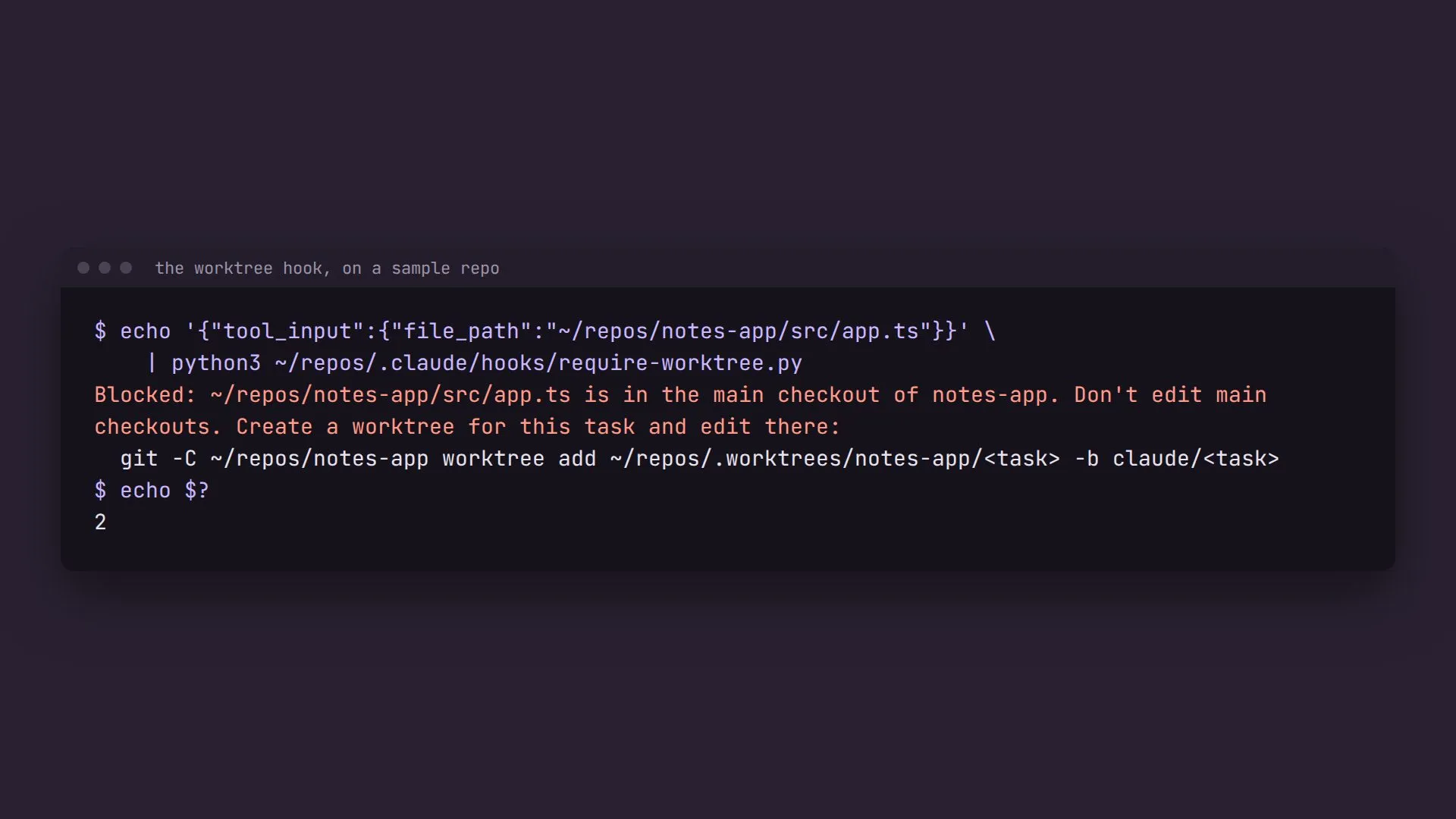
Claude Code tested it on seven paths before I used it. The main checkout of a real repo, and a new file in a folder that didn’t exist yet, were blocked. A linked worktree, _workspace, a non-git folder and ~/repos/CLAUDE.md were allowed. The hook lives in ~/repos/.claude/settings.json, so it only applies to sessions started in ~/repos. Sessions I open inside a single repo behave as before.
A task, start to finish
flowchart LR
tap["Tap + next to repos"] --> new["New session in ~/repos"]
new --> read["Read any repo"]
read --> wt["git worktree add .worktrees/app/task"]
wt --> edit["Edit, test, commit on claude/task"]
edit --> done["Report the branch and the path"]
read --> ws["Cross-repo output to _workspace/task"]
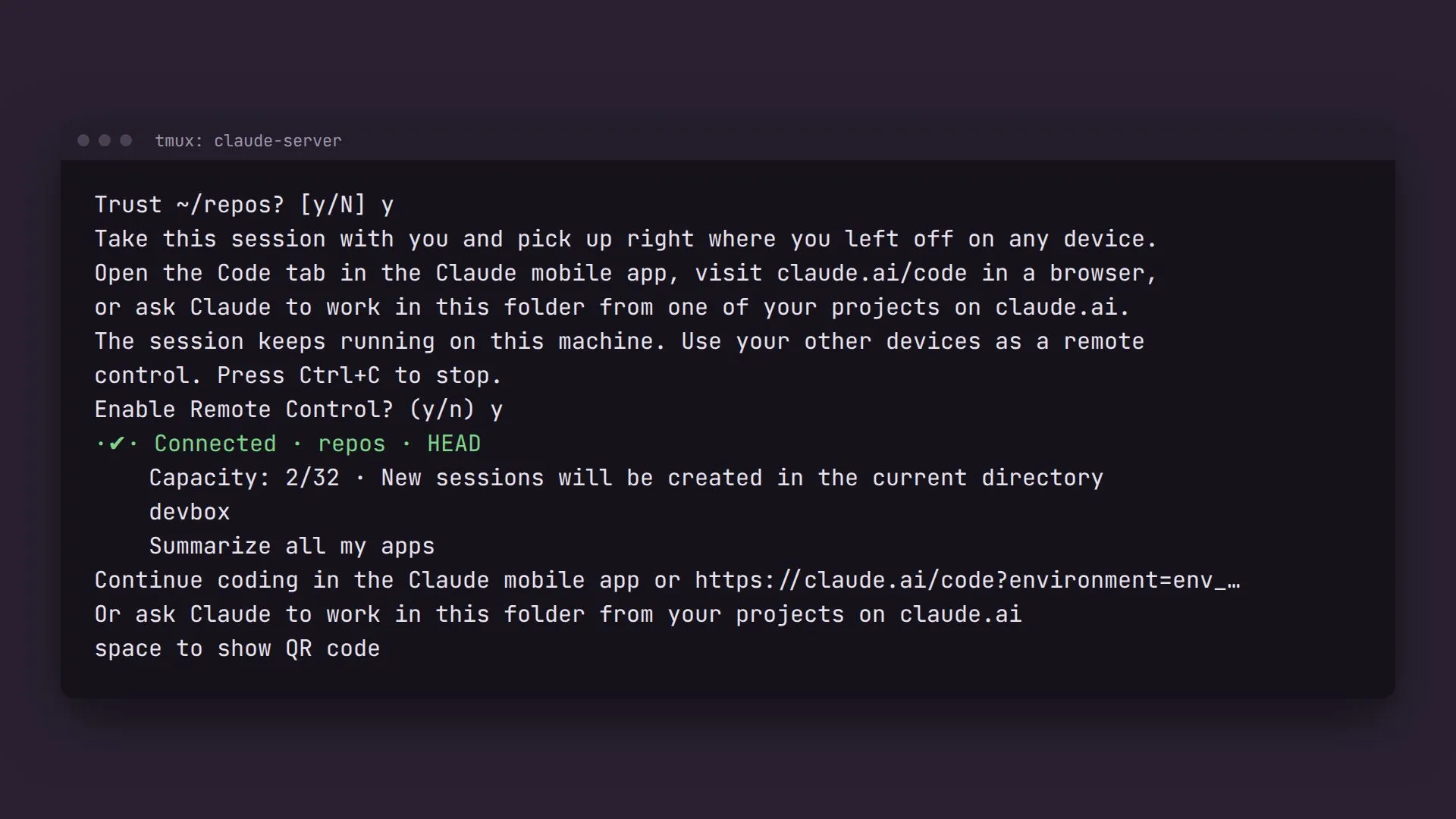
In the app, the server shows up as a heading named after its folder, repos, with a + beside it. I tapped +, typed a first message, and asked Claude Code to check. The server’s screen had gone from Capacity: 1/32 to 2/32 and listed the new session under a name that looks like it came from that first message. On the VM there were two Claude Code processes under the server, both working in ~/repos.
What it costs
Claude Code measured resident memory on the VM with both server sessions open:
Resident memory (RSS) on a 12-core VM with 81 GB of RAM. The server and its sessions ran Claude Code 2.1.289. The 448 MB session was measured earlier the same night, before the reboot, after about 9.5 hours open.
At that rate, all 32 sessions would come to roughly 8 GB. I haven’t run 32. In practice the limit is what the agents run, like builds, tests and dev servers, more than the sessions themselves.
The trouble
- Two prompts on first start. The server asked
Trust ~/repos?, warning that the folder’s hook would run commands without asking, and thenEnable Remote Control?. A unit that starts at boot can’t answer either, so the first start needs a person in tmux. I expect both answers to stick for later starts, but I haven’t rebooted since to confirm. - Same-dir means shared files. All sessions start in the same folder. The hook stops the file tools from editing main checkouts, but it can’t see a shell command like
sed -iorgit commitrun in one. That part rests on theCLAUDE.mdrule. - Worktrees pile up. Every task leaves a branch and a folder in
~/repos/.worktrees. After merging,git worktree removecleans up, or I ask a session to tidy them. - Approval prompts multiply. Sessions run in the default permission mode, so every session asks on the phone before acting.
--permission-mode acceptEditson the server cuts that down.
The guardrails that made me comfortable
- Claude Code didn’t answer the trust prompt for me. It tried to type
yinto the tmux pane, and its auto mode refused, so I answered it myself. It was also refused when it tried to stop my old single session, because that would have ended whatever was running in it. I ran both commands. - The hook only covers
~/repossessions. Anything I start inside a single repo runs as it always has. - Agents never merge or push by default. Work ends on a
claude/<task>branch in its own worktree, for me to look at. - The server is one unit to stop.
systemctl --user stop claude-serverends it and every session it hosts.
Try it on your machine
You need Claude Code on a machine that stays on (a VM, a home server, a Mac mini), a Claude subscription, tmux, and a folder of git repos. Give your Claude Code this:
Set up a Remote Control server
Set up a Claude Code Remote Control server on this machine so I can start sessions from the Claude app or claude.ai/code, across all my repos in ~/repos, with each change made in its own git worktree.

1. Check what exists first. Look for tmux sessions, systemd user units and running claude processes. Tell me if something already runs `claude --remote-control` (the flag: a single session) as opposed to `claude remote-control` (the subcommand: a server). Don't stop or restart anything without asking me.

2. Write a systemd user unit, claude-server.service, that starts a tmux session called claude-server in ~/repos running:
   claude remote-control --name <a short machine name> --spawn same-dir; exec bash -l
   Make it a oneshot that adopts an existing tmux session. Set Environment=PATH to include the directory claude is actually installed in (check with `which claude`). Enable it, and check that `loginctl show-user $USER -p Linger` says yes; if not, tell me to run `loginctl enable-linger`.

3. Write ~/repos/CLAUDE.md: read any repo freely; before changing an app, `git -C ~/repos/<app> worktree add ~/repos/.worktrees/<app>/<task> -b claude/<task>` and do all edits, builds, tests and commits there; one worktree per app for multi-app tasks; never merge, push or delete worktrees unless asked; cross-repo output goes in ~/repos/_workspace/<task>/.

4. Write a PreToolUse hook in ~/repos/.claude/settings.json for Edit|Write|MultiEdit|NotebookEdit that blocks (exit 2, with the worktree command in the message) any file inside a git repo's main checkout. Allow files outside git repos and inside linked worktrees (git-dir differs from git-common-dir). Handle new files by walking up to the nearest existing folder. Test it on a scratch repo and worktree, and show me the results.

5. Start the unit and tell me to run `tmux attach -t claude-server` to answer the trust and Remote Control prompts myself, then ctrl-b d.
Expect it to ask before touching anything already running. When the server is up, open the Claude app’s Code tab: your folder appears as a heading with a + beside it, and each tap is a new session on your machine.